


How to change the date and time stamp for a retro mini camera
To update the camera's time, please follow these steps:
1. Insert the SD card into the camera at least once.
2. Remove the SD card and connect it to an adapter.
3. On your phone, open the Files app, tap "Browse", and then open the folder displayed from the adapter, usually named "Untitled".
Inside the folder, you will see two folders for pictures and videos, and a text file named "TIME".
1. If you are using a PC: Open the "TIME" file, edit it to include your desired date and time, then [Save].
2. If you are using a phone: It is recommended to create a .TXT file named "TIME" on a PC.
Send the file to your phone, then import it into the "Untitled" folder. This will replace the existing "TIME.txt" file with your new file containing the desired date and time.
Please ensure the date and time are correctly formatted. Here is an example of the correct format: 2001/03/21 22:44:01 (Note: If any date component is a single digit, precede it with a 0.)
How to set the time date watermark display on image files
If you encounter photos or videos with a time watermark, please follow these steps:
1. If you are using a PC: Open the "TIME" file, add or edit the existing letter N/Y at the end of the date and time. N means to stop displaying the time watermark, and Y means to display the time watermark, then [Save].
2. If you are using a phone: It is recommended to create a .TXT file named "TIME" on a PC.
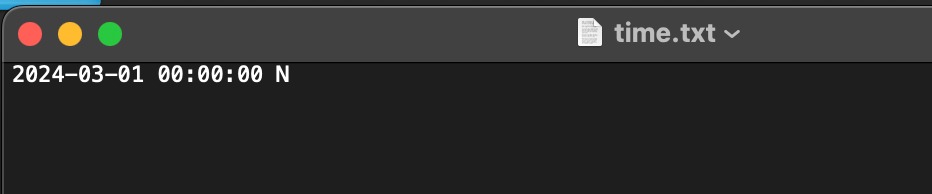
Please ensure the date and time are correctly formatted. Here are examples of the correct format:
1. 2001/03/21 22:44:01 Y
2. 2001/03/22 22:44:01 N
(Note: If any date component is a single digit, precede it with a 0.)


